

Lots of gamers want to play new games without paying a lot. That is why many people search for sites like Ocean of Games. The site lists thousands of games, and every one of them is free to download. It sounds great at first.
The problem is that the games on that site are paid games, and they are shared without permission. That is piracy. It is illegal in many countries, and it can put your computer at real risk.
The good news is that you do not need pirate sites to play great games on a small budget. In 2026, there are many Ocean of Games alternatives that are legal, safe, and often very cheap. Some are even free.
In this guide, you will learn:
- Why people look for Ocean of Games alternatives
- What risks come with pirate sites
- How to pick a good legal game store
- The best legal game stores in 2026
- Easy ways to get games for free or very low prices
- Tips to shop safely online
Let’s get started.
What Is Ocean of Games?
Ocean of Games is a website where people can download PC games for free. It has many types of games, such as action, racing, sports, puzzle, and horror. Many of the games are big titles that cost real money in official stores.
The site has changed its web address many times. It also has many copycat sites with similar names. This is common with sites that share games without permission. When one address gets shut down, a new one shows up.
People like these sites for one clear reason: the games cost nothing. But “free” often comes with a hidden cost, as you will see next.
Why Do People Look for Ocean of Games Alternatives?
There are a few common reasons gamers search for other options.
1. Safety worries: Many people have heard that pirated files can carry viruses. They want a safer way to get games.
2. Games that do not work: Files from unofficial sites are often broken, missing parts, or out of date. Some games crash again and again.
3. No updates: Official stores send patches that fix bugs and add new content. Pirated copies often miss these updates.
4. No online play: Many modern games need an official account to play online. Pirated copies usually cannot connect to online modes.
5. Wanting to support game makers: Some players simply want to pay the people who made the game, so they can keep making more.
6. Legal fears: Some people worry about getting a warning letter from their internet provider.
If any of these sound like you, the options below will help.
The Real Risks of Pirate Game Sites
Before we look at the alternatives, let’s talk about what you risk on sites like Ocean of Games. This is not meant to scare you. It is just good to know the facts.
Malware and Viruses
The site itself may not harm your device. The danger is in the files you download. Pirated games are often packed into installers, and those installers can hide harmful software. This can include programs that spy on you, steal passwords, or secretly use your computer’s power to mine cryptocurrency. That last one can slow your PC down a lot.
Stolen Accounts and Personal Data
Some harmful programs can grab saved passwords from your browser. That could put your email, bank, or gaming accounts at risk. Losing a gaming account with years of purchases hurts. Losing a bank login hurts much more.
Legal Trouble
Downloading games without paying for them is copyright infringement. Rules and punishments are different in each country. In some places, the result is a warning letter. In others, it can mean fines or legal action. Why take the chance when safe options exist?
Poor Game Quality
Even when a pirated game is clean, it may not run well. There are no official patches, no support, and no cloud saves. If something breaks, you are on your own.
Hurting the People Who Make Games
Making a game takes years of work from artists, writers, coders, and testers. When people play without paying, the studio earns nothing. Small studios feel this the most. Many of them close after one failed game.
Now let’s look at better ways to play.
What to Look for in a Legal Game Store
Not all game stores are the same. Here is what to check before you pick one.
Game library: A bigger library gives you more choice. Some stores focus on a certain type of game, such as indie games or classic games.
Price and sales: Look for stores with regular discounts. Many stores run big sales during the year.
Free games: Some stores give away free games on a schedule. This is the closest thing to what pirate sites offer, and it is fully legal.
Refund rules: A good store lets you get your money back if a game does not work for you. Check each store’s rules, since they change from time to time.
Safe payments: The store should use secure checkout and offer trusted ways to pay.
Ease of use: The store should be simple to use, with good search tools and clear game pages.
Extra features: Cloud saves, friends lists, reviews, and mod support all make a store better.
Computer needs. Make sure the store works on your system. Most major stores support Windows, and some also support Mac and Linux.
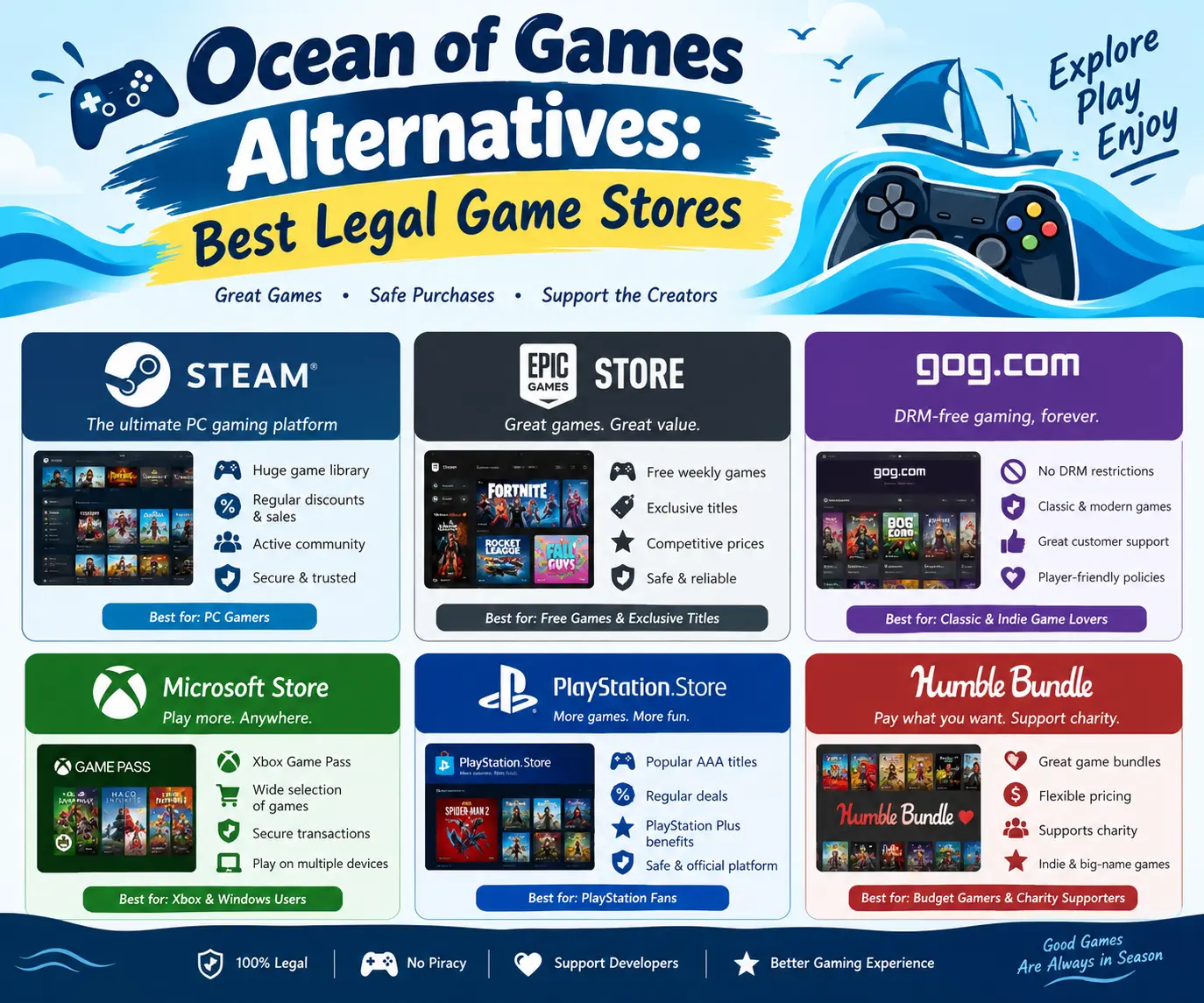
The Best Legal Game Stores in 2026
Here are the top Ocean of Games alternatives. Each one is a real, safe place to buy or claim games. Store features and offers can change, so always check the latest details on each store’s own site before you buy.
1. Steam
Best for: The biggest choice and the most regular sales
Steam is the most popular PC game store in the world. It has a huge library with games of every type and size, from big action titles to tiny indie projects.
Why gamers like it:
- A very large library, with new games added all the time
- Big sales during the year, including seasonal events
- Cloud saves, so your progress is safe
- A strong community with reviews, guides, and forums
- Many free-to-play games
- Mod support for many titles through the Steam Workshop
- Free weekends, where you can try some paid games for a short time
Things to know:
- It is mostly for PC (Windows, with growing support for Mac and Linux)
- Some games use extra launchers or accounts
- With so many games, it can take time to find the good ones
Steam is the easiest place to start if you want to leave pirate sites behind. Use the wishlist feature, and Steam will tell you when a game you want goes on sale. Waiting for a sale is the best money-saving trick on the platform.
2. Epic Games Store
Best for: Free games every week
Epic Games Store is famous for its free game giveaways. It has given away games on a regular schedule for years. You log in, claim the free game, and it stays in your library.
Why gamers like it:
- Free games on a regular schedule
- Many big titles and exclusive releases
- Regular sales and coupons
- A simple, clean layout
- Free-to-play hits are available here too
Things to know:
- The library is smaller than Steam’s
- Some features, like community tools, are less developed
- Free games are only free to claim during the giveaway window
If you want to build a big library without spending money, claiming Epic’s free games each week is one of the best legal ways. Over a year, that can add up to a lot of games.
3. GOG (Good Old Games)
Best for: Classic games and games with no copy protection
GOG started as a place to buy old games that work on modern computers. Today it sells new games too. Its most loved feature is that most games come DRM-free. That means the game files are yours, and you do not need to be logged in to play.
Why gamers like it:
- DRM-free games that you can back up and keep
- A strong list of classic and retro games, fixed to run on new systems
- Fair pricing, with frequent sales
- A simple refund policy
- Bonus items such as soundtracks and manuals with some games
Things to know:
- The library is smaller than Steam’s or Epic’s
- Some very new games may not be available
- The optional GOG Galaxy app brings all your launchers together in one place
GOG is a great pick if you like owning your games for the long term. If you used Ocean of Games to find older games, GOG may be your best legal match.
4. Microsoft Store and Xbox App (with Game Pass)
Best for: Playing many games for one monthly price
The Xbox app and Microsoft Store let you buy games on Windows. The big draw for many people is Xbox Game Pass. With a monthly fee, you get access to a large library of games to download and play. New releases from Xbox studios often land on the service.
Why gamers like it:
- Try many games without paying for each one
- Good for people who finish games fast and want something new
- Works on PC, and on Xbox consoles with the right plan
- Often includes big releases
Things to know:
- Game Pass is a rental-style service. If you stop paying, you lose access to the games
- Plans and prices change, so check the latest options on the Xbox site
- Not every game on the Microsoft Store works the same way as on other stores
If you play lots of different games and do not mind a monthly fee, this can be a smart way to save money compared with buying each game one by one.
5. Humble Store and Humble Bundle
Best for: Cheap bundles that help charity
Humble Bundle is known for “pay what you want” bundles. You choose a price, and you get a group of games. Part of the money often goes to charity, and part goes to the game makers. The Humble Store also sells games on its own, like a regular store.
Why gamers like it:
- Bundles that give many games for a low price
- A share of each sale helps charity
- Most games come with keys for Steam or other stores
- Many DRM-free options
- Good way to find indie games you may not know
Things to know:
- Bundles change often, and each one is only available for a limited time
- You may get games you do not want in a bundle
- Always check which store the key works on
6. Green Man Gaming
Best for: Discounted keys for many stores
Green Man Gaming is an official reseller. It sells keys that you redeem on other platforms such as Steam. The prices are often lower than the list price, and the store has regular sales.
Why gamers like it:
- Good discounts on many popular games
- A loyalty program that gives rewards
- A wide range of titles
- Keys work on the platform listed on the game page
Things to know:
- You still need an account on the platform where you will play
- Always read the game page to see which platform and region the key is for
- Stick to the official site, not random key sellers
7. Fanatical
Best for: Bundles and low-priced keys
Fanatical is another trusted key seller. It is known for bundles that group games at low prices. It also has daily deals and big sale events.
Why gamers like it:
- Bundles with several games at a low price
- Good deals on new and old games
- Some bundles support charity
- Easy to browse by genre
Things to know:
- Check the platform and region before you buy
- Bundle games are redeemed on other stores, so you need those accounts
8. itch.io
Best for: Indie games and free experiments
itch.io is a home for small creators. You can find weird, creative, and fun games here that you will not see on big stores. Many games are free, and many let you pay what you want.
Why gamers like it:
- Thousands of free games
- A strong focus on small and new creators
- Many game jams, where people build games in a few days
- Many “pay what you want” games
- Easy to support makers directly
Things to know:
- Quality is not the same across all games
- Most titles are small, not big blockbusters
- Read the game page and comments before you download
If you love trying new things, itch.io is a great place to spend an afternoon.
9. Ubisoft Connect, EA App, and Battle.net
Best for: Games from one big publisher
Some big publishers run their own stores and launchers.
- Ubisoft Connect is for Ubisoft games.
- EA app is for Electronic Arts games.
- Battle.net is for Blizzard games.
Why gamers like them:
- Direct access to a publisher’s full catalog
- Frequent publisher sales
- Free-to-play titles and free trials on some services
- Subscription plans from some publishers
Things to know:
- Many of these games are also sold on Steam or Epic
- You may need a separate account and launcher for each one
- Subscription options and prices change, so check each publisher’s site
If you only care about a few big franchises, buying direct from the publisher can be simple.
10. Prime Gaming (Amazon)
Best for: Free games with a Prime membership
If you already have an Amazon Prime membership, you may be able to claim free games through Prime Gaming. The free titles change on a regular basis. Some are small indie games, and some are bigger names.
Why gamers like it:
- No extra cost if you already pay for Prime
- New free games on a regular schedule
- Free in-game items for some popular games
Things to know:
- Benefits can change over time, so check what is included
- You need an active Prime membership
- Some games are claimed on other launchers
11. PlayStation Store and Nintendo eShop
Best for: Console gamers
If you play on a console instead of a PC, you need the official store for your system.
- PlayStation Store is for PlayStation games. PlayStation Plus adds monthly games and extra perks.
- Nintendo eShop is for Nintendo Switch games. It runs regular sales and has many indie titles.
Why gamers like them:
- The only official way to buy digital games on those consoles
- Regular sales and seasonal events
- Subscription plans with free monthly games
Things to know:
- Prices are often higher than on PC
- Subscription perks depend on your plan
- Games bought on one system may not work on another
12. GameStop and Local Game Shops
Best for: Physical copies, trade-ins, and used games
Not everyone wants to buy only digital games. GameStop and local game shops sell physical discs and cartridges for consoles. Many also buy used games, which helps you get some money back and lower the price of your next game.
Why gamers like it:
- Physical copies you can lend, sell, or collect
- Used games at lower prices
- Trade-ins that cut the cost of new games
- Helpful staff in many stores
Things to know:
- Stock changes from store to store
- Used game prices vary
- Some new games ship with only part of the content on the disc
Local shops are great for older games and for finding rare titles.
Quick Comparison Table
| Store | Best For | Free Games? | Platform |
|---|---|---|---|
| Steam | Biggest library and sales | Yes, free-to-play and free weekends | PC |
| Epic Games Store | Weekly free games | Yes, regular giveaways | PC |
| GOG | Classic and DRM-free games | Some free titles and giveaways | PC |
| Microsoft Store / Game Pass | Many games for one price | Some free-to-play | PC, Xbox |
| Humble | Cheap bundles | Occasional free offers | PC |
| Green Man Gaming | Discount keys | Occasional free offers | PC |
| Fanatical | Bundles and deals | Occasional free offers | PC |
| itch.io | Indie games | Yes, thousands | PC, Mac, Linux |
| Prime Gaming | Free games with Prime | Yes, with membership | PC |
| PlayStation Store / eShop | Console games | Free-to-play titles | Console |
| GameStop / local shops | Physical and used games | No | Console, some PC |
How to Play Games for Free (Legally)
If your main goal is to spend nothing, you have more options than you might think.
1. Claim Weekly Free Games
Check Epic Games Store every week. Claim the free game, and it is yours to keep. If you do this for a year, your library grows with no cost.
2. Try Free-to-Play Games
Many of the most played games in the world are free to play. They earn money from optional items, not from the game itself. Look for the “Free to Play” tag on Steam and other stores. Just be careful with in-game purchases, especially if kids play.
3. Use Free Weekends and Demos
Steam often runs free weekends. Many games also have free demos. You can play a part of the game first, then decide if you want to buy it.
4. Browse itch.io
Thousands of creators share free games here. Some are short and strange. Some are real gems.
5. Try Open-Source Games
Open-source games are made by communities and are free for everyone to use. They may not look like big blockbusters, but many are fun and polished. They are fully legal and safe if you get them from the official project site.
6. Join Subscription Free Trials
Some services give a short free trial. Remember to cancel before the trial ends if you do not want to pay.
7. Borrow and Share Physical Games
If you play on a console with discs, borrowing from friends or family is fully legal. Many local libraries also lend games in some areas.
How to Save Money on Paid Games
If you are happy to pay a little, you can still spend very little.
Wait for sales: Most games drop in price within months. Big seasonal sales can cut prices a lot.
Use wishlists: Add games to your wishlist on Steam, GOG, and Epic. You will get alerts when prices drop.
Buy older games: Games that are a few years old are often cheap and still great. Many are as good as new releases.
Choose bundles: Humble and Fanatical bundles can give you many games for the price of one.
Check key sellers carefully: Official resellers like Green Man Gaming can have lower prices. Avoid sellers you do not know, because some keys are stolen or wrong for your region.
Try a subscription for a month: If you want to play a few big games, one month of a service can cost less than buying each game. Cancel when you are done.
Buy used physical copies: For console games, used discs can be much cheaper than new ones.
Use gift cards and rewards: Some stores offer loyalty points. Some credit cards and apps give gift cards as rewards.
Tips for Shopping Safely Online
Even on legal sites, it pays to be careful.
Stick to official stores: Type the web address yourself or use the official app. Do not click links in random emails or messages.
Use strong, unique passwords: Use a different password for each store. A password manager makes this easy.
Turn on two-step login: Most major stores offer this. It protects your account even if someone learns your password.
Watch for fake sales: If a deal looks too good to be true, it probably is. Scammers copy store pages to steal card details.
Check the key seller: Before you buy from a key site, read reviews from several places. Only use well-known resellers.
Keep your system updated: Update Windows, your browser, and your security software.
Be careful with kids’ accounts: Set spending limits and parent controls where possible.
Which Store Is Right for You?
Here is a simple guide.
- You want the biggest choice: Steam
- You want free games every week: Epic Games Store
- You love classic and older games: GOG
- You play a lot of different games: Xbox Game Pass
- You want cheap bundles: Humble or Fanatical
- You like small and creative games: itch.io
- You have Amazon Prime already: Prime Gaming
- You play on console: PlayStation Store or Nintendo eShop
- You like physical games: GameStop or a local shop
Many gamers use more than one store. That is normal. There is no rule that says you must pick only one.
Frequently Asked Questions
Is Ocean of Games legal?
No. The games on Ocean of Games are paid games shared without permission. Downloading them is copyright infringement, which is illegal in many countries.
Is Ocean of Games safe?
It is risky. Files from unofficial sites can contain harmful software. Even if a download looks fine, it may hide something that harms your computer or steals your data.
What is the best legal alternative to Ocean of Games?
For most people, Steam is the best starting point because of its huge library and regular sales. If you want free games, Epic Games Store is a strong second choice.
Are there any legal sites with free PC games?
Yes. Epic Games Store gives away games on a regular schedule. Steam, itch.io, and other stores have many free-to-play and free games. Prime Gaming is also an option if you have Amazon Prime.
Can I download full paid games for free?
Not in a legal way, except during official giveaways, free weekends, or trials. Official stores sometimes give away full games for a short time. That is the safe way to get them.
Is Xbox Game Pass worth it?
It can be, if you play many games each year. You pay a monthly fee and get a large library. But you do not own the games, so you lose access if you stop paying.
Are key reseller sites like Green Man Gaming and Fanatical safe?
The well-known ones are official resellers and are generally safe. Still, always check the platform and region for each key. Avoid unknown key sellers with very low prices.
What if my computer is old?
Many great games run well on older computers. Look at indie games on itch.io, classic games on GOG, and older titles on Steam. Always check the system needs on the game page first.
Can I get a refund on a digital game?
Many stores have refund rules. These often depend on how long you played and how soon you ask. Rules change, so read the current policy on each store before buying.
Is it okay to use my old games on a new computer?
On most stores, yes. Your games are tied to your account, not your computer. Log in on the new PC and download your library again. DRM-free games from GOG are even easier because you keep the files.
Final Thoughts
Ocean of Games may look like an easy way to get games, but the risks are real. You can face viruses, broken files, no updates, and legal problems. And the people who made the game get nothing.
The better path is simple. In 2026, legal game stores give you more choice, more safety, and more ways to save than ever before. You can claim free games every week on Epic. You can wait for deep sales on Steam. You can build a collection of classics on GOG. You can enjoy hundreds of indie games on itch.io. You can even rent a huge library with a subscription.
Start with one or two stores. Make a wishlist. Wait for a good sale. Before long, you will have a library of games that are safe, legal, and fully yours.
Happy gaming!
